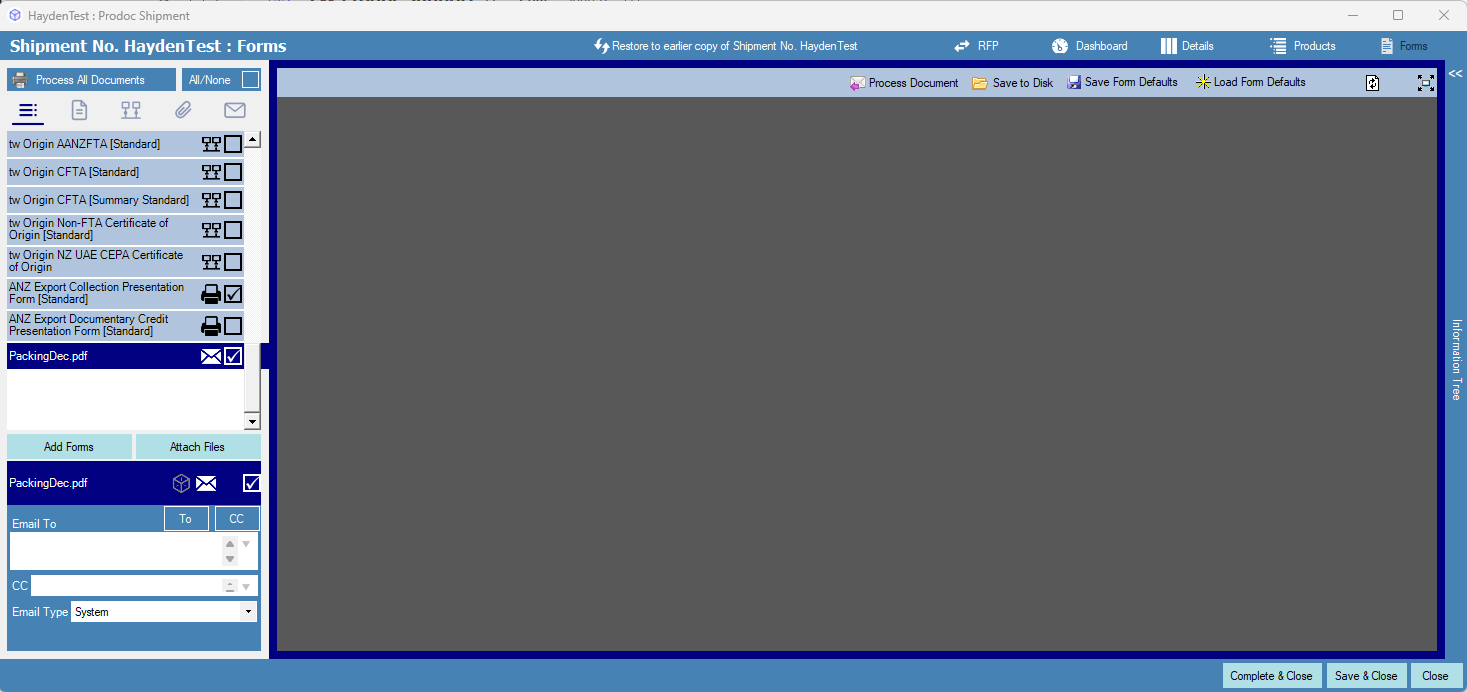
We are aware of an issue where users on the latest Windows 11 release may be unable to view PDF documents stored in Prodoc in the Forms screen. When a PDF file is selected, the background is shown as grey and no file is shown.
This issue can occur on any Prodoc version that is being run on Windows 11. Prodoc Cloud users are unaffected.
Symptoms:
Selecting a stored PDF opens a blank or grey screen.
Cause:
Our investigation has identified that this behavior is cause by a recent Windows update: KB5074109.
When this update is uninstalled, normal PDF viewing functionality is restored. This indicates the issue is caused by a compatibility change introduced by the patch.
Current Status:
We are actively investigating the root cause and working towards a permanent resolution that does not require uninstalling Windows updates. Note that this issues is unrelated to Prodoc version and rolling back to an earlier Prodoc version will not help.
This article will be updated as soon as more information or a fix becomes available.
Example:
Below is an example of how the issue presents.
Expected behavior: The selected PDF document is displayed.
Actual behavior: A blank grey background is shown instead.
Was this article helpful?
That’s Great!
Thank you for your feedback
Sorry! We couldn't be helpful
Thank you for your feedback
Feedback sent
We appreciate your effort and will try to fix the article